
PCFFM Recovery Key Viewer is a small Windows utility for saving readable recovery keys for Windows drive encryption before they are needed. It is especially useful while a device still starts normally and you want to check, before a repair, reinstall, data transfer, hardware change or technical inspection, whether a recovery key exists and can be read locally.
Many Windows devices use drive encryption today without users necessarily noticing it in everyday use. As long as Windows starts normally, this protection usually remains unobtrusive. Before certain work is carried out on a device, however, the recovery key should be known so that an encrypted drive does not become an obstacle if access is required later.
The tool reads locally, in a way that is easy to use even for non-technical users, the information that Windows already makes available to administrators on the device. If a recovery key is found, it can be displayed, copied, saved as a text file or printed for secure paper-based storage. The program does not decrypt drives, disable protection features or recover lost keys.
The file can be started directly. No installation is required.
Why checking before a repair makes sense
For encrypted Windows drives, the recovery key is security-critical information. It may be needed if the startup environment changes, Windows no longer starts as expected, hardware is replaced, a reinstall is being prepared or a drive needs to be read outside the existing Windows installation.
The right time to check is therefore not when a device is already blocked or a drive is already inaccessible. The practical value of PCFFM Recovery Key Viewer lies in checking early: as long as Windows is still running, you can verify whether a recovery key can be read from the device and should be stored securely.
Especially before a support appointment, data migration, Windows reinstall or hardware inspection, this quick check can save time and reduce avoidable risk. If a key is found, it can be saved or printed immediately. If no key is displayed, there is still time to check other storage locations before further work is carried out.
Typical use cases
PCFFM Recovery Key Viewer is not a general-purpose diagnostic program, but a focused utility for one specific question: Is a recovery key for an encrypted Windows drive readable locally, and can it be stored securely before further work is performed?
| Situation | Why checking makes sense | What the tool can do |
|---|---|---|
| Before reinstalling Windows | Before deleting, overwriting or reinstalling a system, it should be clear whether encrypted drives are involved. | The tool can display a readable recovery key so it can be saved beforehand. |
| Before repairing startup behavior | Work on boot files, startup options or recovery functions can be relevant for unlocking protected systems. | The tool shows whether Windows provides a recovery key for the drive. |
| Before replacing hardware | If security-relevant hardware changes, an encrypted system may behave differently from its previous normal operation. | The key can be read in advance and stored securely. |
| Before transferring data | When data is to be moved to a new device, access to encrypted drives is not always straightforward. | The tool helps check whether a key is available for access. |
| Before data recovery | With encrypted drives, the recovery key is often crucial before data can be checked outside the running system. | A locally readable key can be saved in advance. |
| Before a support appointment | If the key has to be searched for during an appointment, the process can be delayed significantly. | The user can check beforehand whether a key can be displayed and made available. |
How to use PCFFM Recovery Key Viewer
1. Download the file
Download the file “PCFFM_Recovery_Key_Viewer.exe” using the download button on this page. In most cases, the file will be saved to the Downloads folder of your Windows PC. The program does not need to be installed and can be deleted again after use.
If the file is to be used on another Windows device, it can be copied to a USB flash drive and started from there. Only start the file if it comes from this official download page.
2. Start the program and confirm the Windows prompt
Start the file by double-clicking it. When it opens, Windows may immediately display a User Account Control prompt. This prompt is part of the program startup because information about Windows drive encryption can usually be read more completely with administrator privileges.
Only confirm the prompt if the file name is “PCFFM_Recovery_Key_Viewer.exe” and you deliberately downloaded the file from this page. The program interface will then open.
3. Read the recovery key
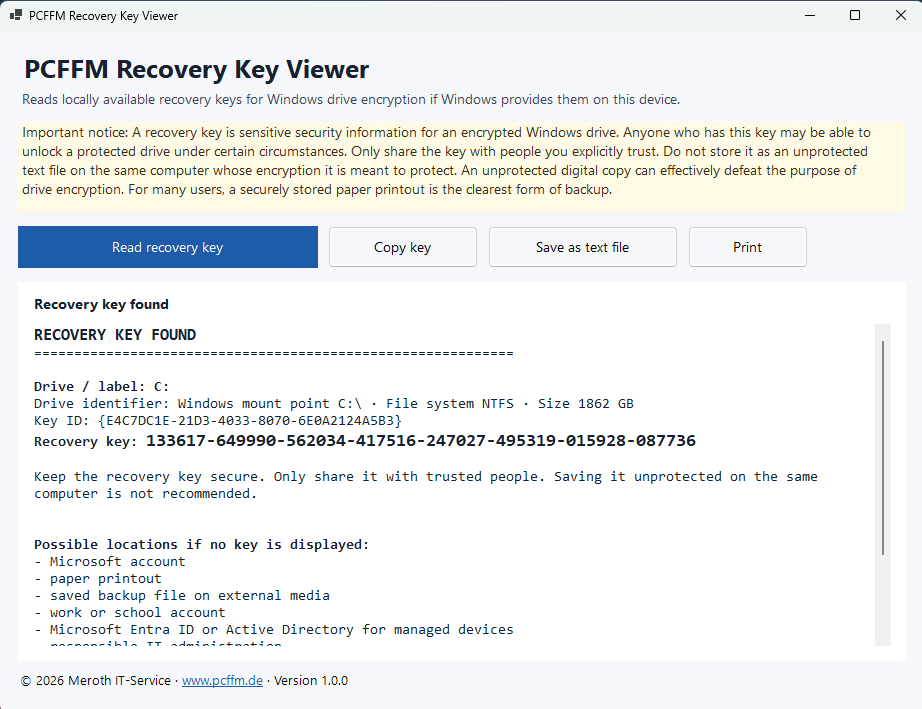
Click “Read recovery key” in the program. The tool then queries the information about drive encryption that Windows provides. The check is local and read-only. Nothing is decrypted, disabled, repaired or changed in the system configuration.
If a key is found, the result area displays the message “Recovery key found”. In addition, the drive, drive information, key ID and recovery key are shown.
4. Copy, save or print the key
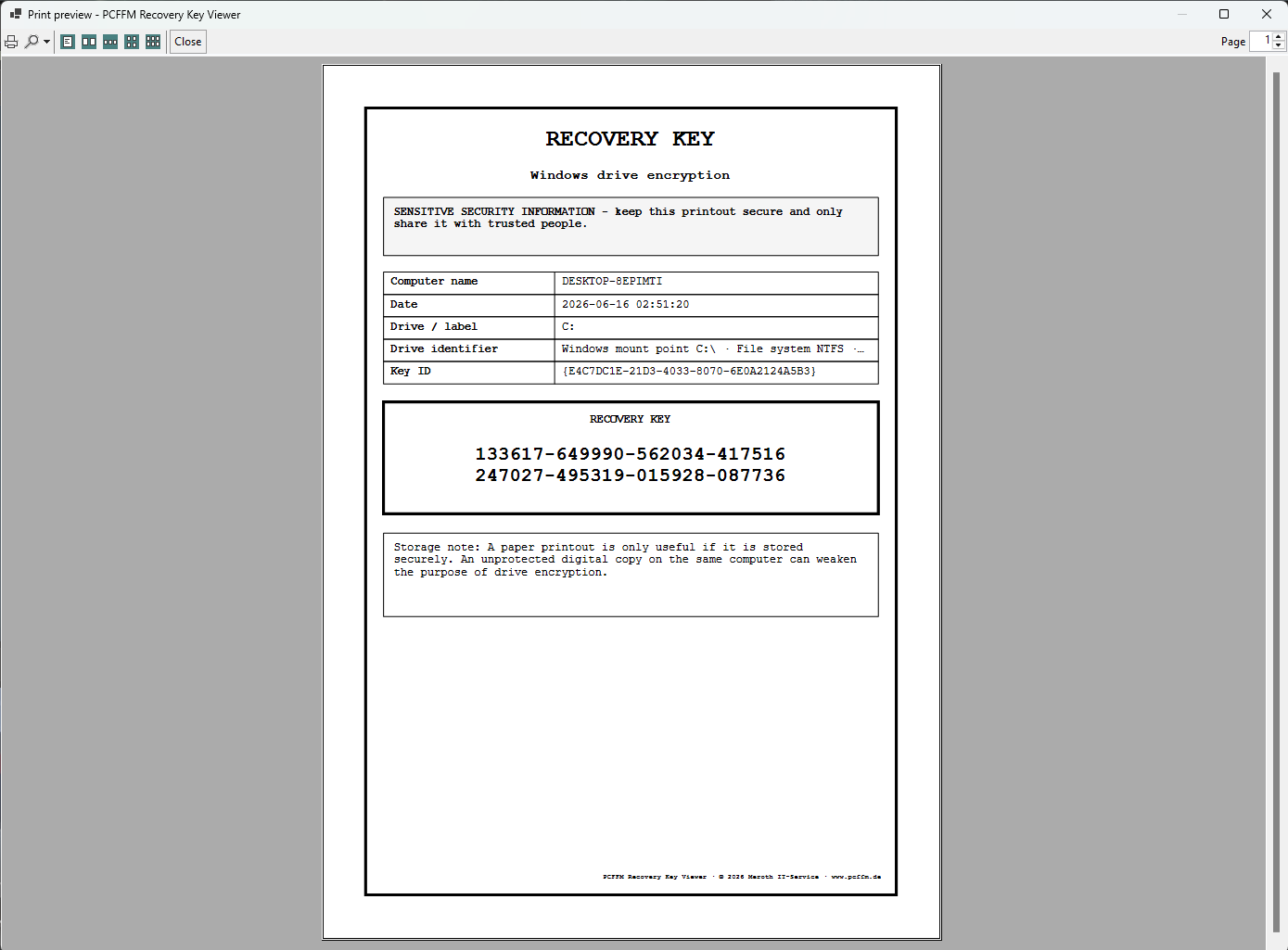
If a recovery key is displayed, several options are available. “Copy key” copies the key to the clipboard. “Save as text file” creates a file. “Print” generates a clear printout containing the key, drive, key ID and security notice.
For many users, a securely stored paper printout is the most understandable form of backup. However, a printout should not be left lying around openly; it should be treated as a confidential document.
5. Store the key securely
A recovery key is sensitive security information. Anyone who has this key may be able to unlock a protected drive under certain circumstances. Only share the key with people you trust, and do not store it unprotected on the same computer whose encryption it is intended to protect.
An unprotected digital copy on the same computer can effectively defeat the purpose of drive encryption. Store the key in a way that keeps it available in an emergency while preventing unauthorized access.
What information the program displays
If a recovery key is found, PCFFM Recovery Key Viewer displays the most important information in a compact view. The focus is not on comprehensive system diagnostics, but on the details needed to store the recovery key safely.
| Displayed item | Meaning | Why this information is useful |
|---|---|---|
| Recovery key found | Windows has provided a readable recovery key on this device. | The key can be saved before further work is performed on the system. |
| Drive / label | Shows which drive the found key belongs to, for example C:. | If several drives are present, assigning the key correctly is important. |
| Drive identifier | Describes the detected drive with technical details such as Windows mount point, file system and size. | Helps identify the affected drive more clearly. |
| Key ID | The identifier of the associated recovery key. | Can be useful when comparing the key with other backup locations. |
| Recovery key | The actual numeric key that should be stored securely. | This information is confidential and must be protected carefully. |
| Possible storage locations | References to typical places where keys may be stored. | Helpful if no key is displayed on a device. |
Print function for secure storage
PCFFM Recovery Key Viewer includes a print function that can produce a clear printout of a found recovery key. The print view contains the recovery key, the key ID, drive details, computer name, date and a prominent notice about secure storage.
The printout is intentionally kept simple so the essential information remains easy to read. For many private users, a securely stored paper printout is easier and more reliable than an unprotected file on the same computer.
A paper printout must also be protected. It should not be left in the open or shared with uninvolved persons. Anyone who has the recovery key may be able to access the protected drive under certain circumstances.
Where a recovery key may be stored
If no recovery key is displayed on a device, this does not automatically mean that no key exists. The key may already have been stored elsewhere. This depends on how Windows was set up, whether a Microsoft account is used, whether the device is managed by an organization and how drive encryption was originally enabled.
- the device user’s Microsoft account
- a work or school account
- Microsoft Entra ID for organization-managed devices
- Active Directory for domain-joined devices
- a paper printout
- a saved backup file on external media
- a USB flash drive
- documents from a previous IT service provider
- documentation held by the responsible IT administration
What matters is that a copy of the key remains accessible in an emergency. A file stored only on the protected computer may be useless if that exact device later no longer starts or the drive is locked.
What the tool deliberately does not do
PCFFM Recovery Key Viewer is a reading and backup utility for existing recovery keys provided by Windows. It is not a decryption program and not a tool for bypassing security mechanisms.
- no bypassing of Windows drive encryption
- no decryption of drives
- no reconstruction of lost recovery keys
- no guessing or calculating of keys
- no reading of Windows passwords
- no reading of TPM secrets
- no searching through private files
- no reading of browser data, emails or documents
- no automatic transfer of recovery keys to Meroth IT-Service
- no changes to Windows, boot configuration, registry, TPM, UEFI or BIOS
Why Windows asks for administrator rights on startup
The graphical version of PCFFM Recovery Key Viewer requests the required administrator rights as soon as it opens. This allows the Windows drive encryption query to run with the permissions that Windows typically requires for complete information.
The permissions prompt does not mean that the program performs repairs or changes system settings. Its purpose is to allow the program to read the drive encryption information provided by Windows as completely as possible.
| Area | Why elevated rights may be needed | What this does not do |
|---|---|---|
| Drive encryption | Windows provides drive encryption details more completely with administrator rights. | The drive is not decrypted. |
| Key display | A recovery key can only be displayed if Windows provides it in this context. | No key is calculated, guessed or obtained from external sources. |
| Saving a text file | The displayed key can be saved locally as a file on request. | There is no hidden storage. |
| Printing | A printout suitable for secure storage can be created. | There is no automatic sharing with third parties. |
| System state | The software reads the status. | No Windows settings are changed. |
Note on browser and Windows security warnings
When downloading or starting an EXE file, your browser or Windows SmartScreen may display a security warning. Such messages can appear especially with newly provided programs.
Only start the file if you deliberately downloaded it from this official download page and the file name is “PCFFM_Recovery_Key_Viewer.exe”. If you are unsure, do not start the file.
Frequently asked questions about PCFFM Recovery Key Viewer
When should I use the program?
The tool is intended for use before work is carried out on Windows, drives or hardware. This includes reinstalls, repairs, data transfers, startup problems, hardware replacement and support preparation. The greatest benefit is achieved while Windows is still running normally and can provide the recovery key.
Can the program recover a lost recovery key?
No. PCFFM Recovery Key Viewer can only display keys that Windows provides on the respective device. A lost or inaccessible key cannot be reconstructed.
Does the program decrypt my drive?
No. The program does not decrypt drives, disable encryption or change Windows settings.
Why does Windows ask for administrator rights immediately on startup?
The prompt appears when the program opens because Windows can provide information about drive encryption more completely with administrator rights.
Is the key automatically sent to Meroth IT-Service?
No. The program does not automatically transfer recovery keys. Displaying, copying, saving or printing is performed locally and visibly by the respective user action.
Is a text file on the same computer a good backup?
It is not recommended as the only backup. An unprotected digital copy on the same computer can weaken the purpose of drive encryption and may not be accessible in an emergency. A secure location outside the affected system is better, for example a securely stored paper printout or protected documentation.
Why is the file about 75 MB?
PCFFM Recovery Key Viewer is provided as a portable single-file application. This means the program does not need to be installed and does not require a separately installed .NET runtime on the Windows PC being checked. In addition to the actual program, the EXE therefore contains the required components of the .NET 8 runtime. The file size is mainly the result of making the tool start directly from the Downloads folder or a USB flash drive without requiring additional components to be installed first.
Is PCFFM Recovery Key Viewer a Microsoft product?
No. PCFFM Recovery Key Viewer is an independent utility from Meroth IT-Service. BitLocker is a drive encryption feature of Microsoft Windows.
Download
Download PCFFM Recovery Key Viewer only from this page. Save the file on the Windows PC whose recovery key is to be checked, or on a USB flash drive if the program is being used in a technical support case.
Werbung



(**) UVP: Unverbindliche Preisempfehlung
Preise inkl. MwSt., zzgl. Versandkosten