
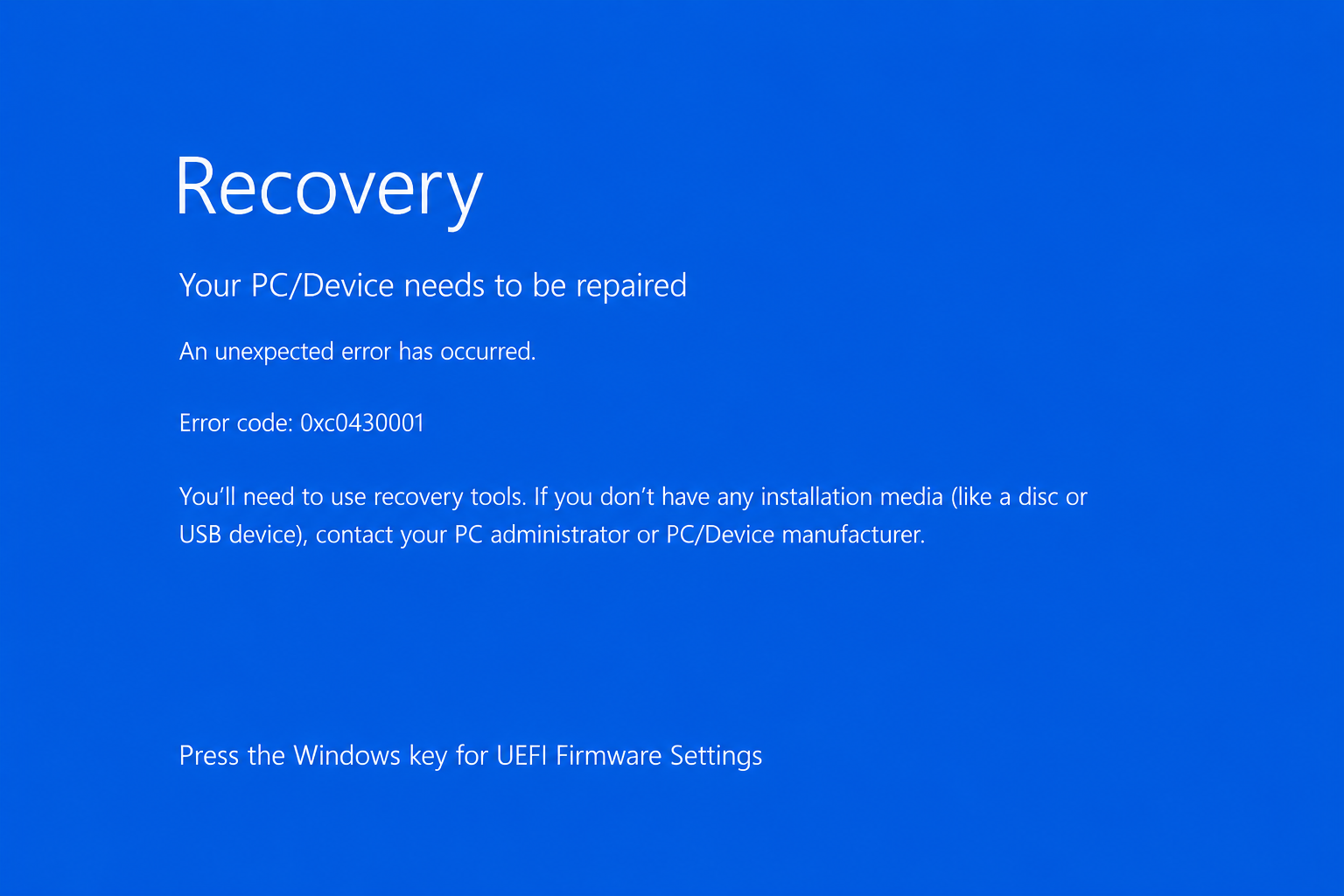
After the release of the cumulative Windows 11 update KB5094126 on June 9, 2026, early administrator reports describe devices that no longer boot normally to the Windows sign-in screen.
In the cases known to Meroth IT-Service from customer support, the locally installed Windows Recovery Environment does not appear. Instead, the device displays a BSOD-style boot error stating that recovery tools are required: “You’ll need to use recovery tools. If you don’t have any installation media (like a disc or USB device), contact your PC administrator or PC/Device manufacturer.”
This distinction matters technically, because it suggests that the device cannot successfully load its own recovery environment and may therefore require external Windows installation or recovery media.
In this scenario, the screen shows error code 0xc0430001. The reports are closely timed with the June 2026 update for Windows 11 version 24H2 and 25H2.
The currently verifiable position is this: Microsoft documents error code 0xc0430001 in connection with updated installation media, Secure Boot validation, and the boot.stl file. At the same time, administrators in unofficial forums are reporting startup failures after KB5094126 on existing Windows installations.
Inhaltsverzeichnis
Current status
The currently verifiable position is as follows: KB5094126 is a cumulative update for Windows 11 24H2 and 25H2. Microsoft officially documents error code 0xc0430001 in connection with dynamically updated Windows images, installation media, Secure Boot validation, and the boot.stl file. At the same time, there are current field reports of devices failing to boot after KB5094126 and showing 0xc0430001. At this point, Microsoft has not officially confirmed that KB5094126 generally causes a widespread startup issue on normal existing Windows installations.
This cautious assessment is important in practice. The error should be taken seriously, but it should not be overstated. Affected devices should first be handled in a data-preserving way: do not rush into a reinstall, make sure the BitLocker recovery key is available, identify the correct Windows volume, back up important data, analyze the update state, and then repair the system in a targeted manner. In business environments, update deployment should be controlled and the fault pattern should be documented by device model and firmware version. This helps prevent a potentially repairable boot or update issue from turning into unnecessary data loss or a larger operational outage.
What is KB5094126?
KB5094126 is a cumulative update for Windows 11 version 24H2 and Windows 11 version 25H2. According to Microsoft, the update raises Windows 11 24H2 to build 26100.8655 and Windows 11 25H2 to build 26200.8655. It is a security-relevant Patch Tuesday update released on June 9, 2026. Cumulative updates do more than replace individual program files. They can update components that are relevant to the boot process, update servicing, Windows security, driver integration, the servicing stack, the kernel, and overall system stability.
Microsoft’s official KB5094126 support page currently does not list a general known issue that forces normal existing Windows installations into a mass 0xc0430001 recovery failure. That limitation matters. Based on the currently available information, Microsoft has not confirmed a general boot failure affecting all installed Windows 11 systems after KB5094126. Anyone investigating the error should therefore avoid assuming that the update alone is automatically the root cause.
At the same time, Microsoft’s documentation contains a notable deployment note: when dynamic updates such as this update are applied to an existing Windows image, the boot.stl file must be present in the installation media. If that file is missing, booting from the installation media can fail with error code 0xc0430001. Microsoft also explains that boot.stl is used during Secure Boot validation and must match the Windows version and processor architecture of the updated image.
This note mainly concerns updated installation media, customized images, deployment workflows, and recovery media. It is highly relevant for IT teams using Autopilot, Intune, Microsoft Configuration Manager, MDT, custom WIM images, PXE boot, or manually updated USB media. For a normal private device that received the update through Windows Update, however, the note does not prove that the exact same mechanism is preventing the machine from booting.
The connection with Secure Boot and boot.stl
Secure Boot is a security feature of modern UEFI systems. It is designed to prevent untrusted or tampered boot components from running before the operating system loads. On current hardware, Windows 11 typically requires UEFI, TPM, and Secure Boot, or at least integrates these features closely into its security architecture. If a device fails before Windows itself starts, Secure Boot is therefore one of the key diagnostic areas.
Microsoft’s note about boot.stl deserves particular attention. Microsoft states that this file is used during Secure Boot validation and must match the Windows version and architecture of the updated image. If dynamic updates are integrated into a Windows image and boot.stl is missing, a device may fail to boot successfully from the installation media. Based on Microsoft’s wording, this primarily applies to updated installation media and prepared Windows images.
For normal existing installations, this does not prove that the same mechanism is responsible for the recovery failure after KB5094126. The note is still valuable, because it shows that error code 0xc0430001 is not just a generic Windows error. It sits in the context of boot validation, Secure Boot, and update integration. If several devices fail to boot after a cumulative update, the investigation should therefore not stop at file system errors or driver problems. Firmware version, Secure Boot status, BitLocker, boot files, pending updates, and the recovery media in use all belong in the analysis.
What affected users should do first
Anyone facing a machine with error code 0xc0430001 should first determine whether important data is stored on the device. If it is, data backup comes before repair. This is especially important for personal laptops, Surface devices, business workstations, and small companies without a current daily backup. Startup Repair or uninstalling the latest quality update is not normally intended to delete user data. On a system that no longer boots, however, this should not be taken for granted.
In the Windows Recovery Environment, Command Prompt often opens at X:\Windows\System32. Drive X is not the internal Windows installation; it is the temporary recovery environment. The actual Windows partition may be C, D, E, or another drive letter. Before running any repair command, you should identify where the Windows folder and the user profile directory are located. Simple commands such as dir C:\Windows, dir D:\Windows, or diskpart followed by list volume usually provide quick clarity.
If data needs to be backed up, Robocopy is often more reliable in the recovery environment than a manual copy attempt. Robocopy can copy large profile folders, log errors, and skip problematic junction points. User profiles in particular contain legacy compatibility links such as “Application Data” or “Documents and Settings”, which can otherwise cause loops or error messages. For a rescue copy, do not use /MIR, because that option can also delete files at the destination.
- Identify important data: Desktop, Documents, Downloads, Pictures, email archives, line-of-business software, local databases, and browser profiles.
- Check the BitLocker status before running repair commands.
- Clearly identify the Windows drive letter inside the recovery environment.
- Copy data to an external drive and document the copy process with a log file.
- Only after the data situation is under control should Startup Repair, update removal, or offline repairs be attempted.
One workaround reported in the field is to temporarily disable Secure Boot in UEFI/BIOS, start the device, enter the BitLocker recovery key if prompted, and allow Windows to boot fully. Once Windows is running, install the latest BIOS/UEFI firmware directly from the device manufacturer, for example through HP Support Assistant, HP Image Assistant, Lenovo Commercial Vantage, Dell Command Update, or the respective manufacturer’s support portal.
After that, install KB5094126 or allow the pending installation to complete. Once the system has restarted fully and Windows has finished processing the update, re-enable Secure Boot in UEFI/BIOS. In environments where the option is exposed separately, the Microsoft CAs should also be enabled again. This approach is only appropriate when the data situation is under control and the firmware source is clearly trusted.
Important: Disabling or re-enabling Secure Boot regularly triggers BitLocker recovery because the measured boot environment changes. Before changing Secure Boot, TPM settings, boot order, or UEFI keys, make absolutely sure that BitLocker has either been properly suspended/disabled or that the correct BitLocker recovery key is available. Without that key, the drive may remain technically intact, but the data can become practically inaccessible. Changing Secure Boot without the BitLocker recovery key risks effective data loss.
Further reading
Meroth IT-Service ist Ihr lokaler IT-Dienstleister in Frankfurt am Main für kleine Unternehmen, Selbstständige und Privatkunden
Kostenfreie Ersteinschätzung Ihres Anliegens?
Werbung


(**) UVP: Unverbindliche Preisempfehlung
Preise inkl. MwSt., zzgl. Versandkosten